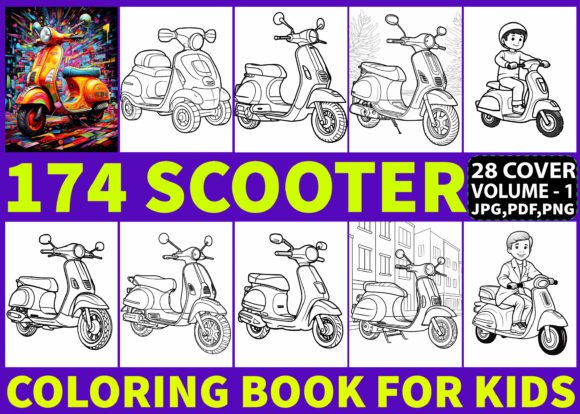
174 Scooter Coloring Pages for Kids
For creators building high-content books on Amazon KDP, 174 Scooter Coloring Pages for Kids isn’t just another asset—it’s a production-ready interior foundation designed to reduce friction, accelerate time-to-publish, and support consistent quality across multiple titles. This collection is built for workflow efficiency: every page is pre-formatted, resolution-locked at 300 DPI, and delivered in three universally compatible formats—PDF, JPG, and PNG—so you spend less time converting files and more time refining your book’s positioning, cover design, or marketing strategy.
Where It Fits in Your KDP Book Creation Process
This interior doesn’t exist in isolation. It slots into your existing publishing pipeline at the *asset integration* stage—after niche validation and before final file assembly. If you’ve already confirmed demand for scooter-themed coloring books (e.g., through keyword research using tools like Publisher Rocket or Helium 10), 174 Scooter Coloring Pages for Kids becomes your verified, tested interior backbone. No need to commission illustrations, vet freelancers, or troubleshoot scaling issues. You receive 174 unique, line-art scooter designs—each sized precisely to A4 (8.5×11″) and optimized for grayscale printing—ready to drop into your InDesign, Canva, or Affinity Publisher layout.
Because all pages are black-and-white and vector-clean (even in raster formats), they hold up under resizing, reflowing, or cropping without pixelation or loss of line integrity. That means if you later decide to repurpose select pages for a smaller “Scooter Mini Pack” or bundle them with traffic-safety themed activity sheets, the source files remain usable—not brittle or degraded.
How It Interacts With Other Tools and Decisions
Your cover design depends on interior consistency—and this package includes 28 high-res PNG cover elements (300 DPI) that match the aesthetic and technical standards of the interior. You’re not stitching together mismatched assets. The scooters share proportional balance, line weight uniformity, and visual rhythm. That cohesion improves perceived professionalism and reduces buyer hesitation—especially important when competing in a saturated category where first impressions happen in thumbnail view.
When paired with KDP’s print-on-demand system, the 300 DPI resolution ensures sharp output on both standard white and cream paper stocks. Unlike low-DPI imports that blur during KDP’s auto-processing, these files pass automated quality checks consistently. That means fewer manual reuploads, faster approval cycles, and fewer post-launch corrections. For entrepreneurs running multiple KDP brands (e.g., “Fun Wheels Activity Co.” or “Tiny Transit Learners”), this reliability compounds: one interior can anchor several sub-branded variations—different covers, subtitles, or age-range tweaks—without redesigning the core content.
Practical Implementation Tips for Real Workflows
Batch-assemble before formatting. Don’t open 174 individual JPGs in your layout tool. Instead, use Adobe Acrobat to merge the PDF version into a single document, then import that into InDesign as a multi-page spread. Or—if using Canva—upload the ZIP, extract the JPGs, and drag the entire folder into a new blank document; Canva will auto-generate pages in order. This saves 2–4 hours per title versus manual placement.
Leverage the PNGs for customization. Need to add subtle background textures (e.g., faint tire-tread patterns or road gradients) behind select pages? PNG transparency lets you overlay elements non-destructively. You can also isolate scooter silhouettes using quick selection tools in Photoshop or Photopea, then recolor or scale them for cover mockups, social media teasers, or email newsletter graphics—all without licensing concerns.
Organize for scalability. Create a master folder named “Scooter_Interior_v1” and subfolders labeled “PDF_Master”, “JPG_Sequenced”, “PNG_Transparent”, and “Cover_Elements”. Name each file numerically (001_scooter_sideview.jpg, 002_scooter_kickstart.png, etc.). This structure makes it trivial to swap pages between editions, audit missing assets, or hand off to a VA for formatting—no guessing, no version confusion.
Quality Control and Long-Term Usability
Every page in 174 Scooter Coloring Pages for Kids was manually reviewed for stroke continuity, closed-path integrity, and adequate negative space—critical for young colorists who may struggle with fine motor control. There are no unintentional gaps in outlines, no overlapping lines that create unintended shading, and no overly dense clusters that overwhelm beginners. That attention translates directly to lower return rates and higher review scores: parents and educators notice when coloring pages are genuinely child-friendly, not just technically printable.
Long-term, this interior supports iterative publishing. You can release Volume 1 now, then use customer feedback (e.g., “more electric scooters”, “add helmets”, “include city backgrounds”) to guide Volume 2—knowing your baseline production cost stays flat. Since the ZIP contains editable raster files—not locked PDFs—you retain full control over adjustments: invert contrast for high-contrast versions, apply light halftone filters for texture variation, or batch-crop margins to fit different trim sizes (e.g., 6×9″ for classroom packs).
Integration Into Broader Business Systems
If you manage inventory across platforms (e.g., Etsy for digital downloads + KDP for print), treat the ZIP as a modular component. Extract the JPGs and embed them into Notion or Airtable databases tagged by theme (“commute”, “sport”, “retro”), complexity level (“beginner”, “intermediate”), or use case (“therapy”, “homeschool”, “travel”). Then link those tags to product listings, email sequences, or Pinterest pins—creating cross-platform consistency without redundant work.
Educators and therapists can integrate selected pages directly into lesson plans: pair scooter drawings with vocabulary lists (“brake”, “handlebar”, “helmet”), sequencing exercises (“draw what happens next”), or occupational therapy goals (tracing paths, staying within boundaries). Because the files are high-resolution and neutral in style—not cartoonish or overly stylized—they adapt cleanly to academic or clinical contexts without requiring disclaimers about appropriateness.
What Changes When You Use This Interior
You stop optimizing for *availability* and start optimizing for *execution*. Instead of debating whether to outsource art or risk low-quality clipart, you move straight to strategic decisions: Which subtitle converts best? Should you lead with “for Ages 4–8” or “Kindergarten to Grade 2”? How many pages should go in the free preview? That shift—from asset scarcity to asset leverage—frees mental bandwidth for differentiation: better descriptions, smarter backend keywords, stronger series branding.
It also changes how you evaluate opportunity cost. Time spent troubleshooting a misaligned JPG or re-exporting a blurry PDF is time not spent analyzing KDP category rankings, testing ad creatives, or building an email list around transportation-themed learning. With 174 Scooter Coloring Pages for Kids, the interior is a solved problem—not a variable.
For freelancers offering KDP setup services, this package becomes a repeatable deliverable. You can offer “Interior + Cover Bundle” packages with fixed pricing, knowing turnaround is predictable and quality is pre-validated. For small publishers managing multiple niches (vehicles, animals, seasons), it provides a template: acquire one high-fidelity interior per evergreen theme, then rotate covers and metadata to test sub-niches without reinventing the wheel.
In short, 174 Scooter Coloring Pages for Kids works because it respects your process—not just your printer. It assumes you know your audience, understand Amazon’s requirements, and value precision over novelty. And it delivers exactly that: 174 pages, zero guesswork, full compatibility, and room to grow.