St. Patrick’s Day Coloring Pages
If you're building a creative side hustle—or scaling an existing Amazon KDP business—you’ve likely noticed how seasonal niches like St. Patrick’s Day Coloring Pages consistently outperform generic themes. But not all coloring page bundles deliver what they promise. Many creators unknowingly download low-resolution files, mismatched formats, or poorly spaced designs—only to face rejected interiors, blurry prints, or disappointed buyers. That’s why understanding what truly makes a St. Patrick’s Day Coloring Pages collection *KDP-ready* matters more than ever.
What Makes These Coloring Pages Different—and Why It Matters
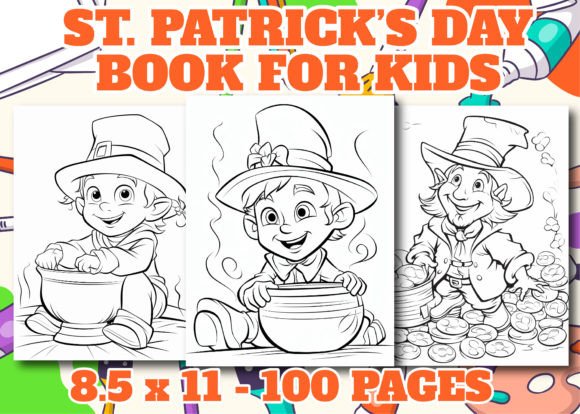
This isn’t just another set of clipart-style outlines. These are professionally crafted, high-resolution St. Patrick’s Day Coloring Pages designed specifically for print-on-demand and Amazon KDP interiors. Each design is created at 300 DPI, in standard A4 (8.5” x 11”) dimensions—ensuring crisp lines and clean edges whether printed on matte paper or premium cardstock. You’ll receive 50 unique JPG files, 50 transparent-background PNGs, and 50 fully editable AI vector files—plus a polished cover image—all bundled in one easy-to-download .zip file.
That format variety isn’t just convenient—it’s strategic. JPGs work reliably for KDP uploads, PNGs let you layer or composite with other assets, and AI files give you full control over line weight, color fills, and scalability without pixelation. Most importantly, every file is sized correctly from the start—no guesswork, no last-minute resizing that distorts proportions or crops key details.
Common Mistakes That Undermine Your KDP Results
Many sellers assume “coloring pages = easy upload.” But small oversights compound quickly:
- Assuming resolution equals quality. A file labeled “high-res” might be upscaled—not native 300 DPI. Upscaled images look soft or jagged when printed, especially on larger formats. Real 300 DPI means each inch contains 300 actual pixels—not stretched ones.
- Overlooking bleed and margin safety. Some free or low-cost bundles include designs that run right to the edge—no room for KDP’s required 0.125” margin. That leads to unintentional cropping, missing shamrocks, or clipped text on your interior pages.
- Mixing incompatible formats. Receiving only PDFs (without layered JPG/PNG/AI) limits flexibility. You can’t easily isolate elements for marketing thumbnails, social media teasers, or custom bundles—slowing down iteration and testing.
- Ignoring color model consistency. RGB files often shift hues unpredictably in CMYK print environments. These St. Patrick’s Day Coloring Pages are built with print-safe grayscale line art—ensuring predictable contrast and ink efficiency across printers.
These aren’t hypothetical concerns. One creator reported a 22% drop in customer reviews after using a bundle where half the pages had inconsistent line thickness—some too faint to scan well, others so bold they bled through thin paper. Another spent three weeks reformatting a “ready-to-upload” pack before realizing the AI files were flattened, not layered—making edits impossible.
How to Choose—and Use—St. Patrick’s Day Coloring Pages Wisely
Before uploading to KDP or integrating into a POD workflow, ask yourself three practical questions:
- Can I verify the native resolution? Open one JPG in any image viewer that shows EXIF data (like Preview on Mac or IrfanView on Windows). Confirm it reads exactly 2550 × 3300 pixels (for 8.5” × 11” at 300 DPI). If it’s smaller—even by 100 pixels—you’re risking visible softness.
- Do the PNGs actually have transparency? Open a PNG in Photoshop or GIMP and check if the background disappears when toggled off. If it defaults to white or gray, the transparency wasn’t properly saved—limiting your ability to overlay on colored backgrounds or themed covers.
- Are the AI files truly vector-based? In Adobe Illustrator, zoom past 400%. If lines stay razor-sharp—not pixelated—you’re working with real vectors. Also, try selecting individual elements: if shamrocks, leprechaun hats, or Celtic knots move independently, the file is well-organized and production-ready.
Real-world tip: Test one page first. Upload a single interior file to KDP’s previewer. Zoom in on fine details—the curve of a harp string, the crosshatch inside a clover leaf. If edges blur or stair-step, pause. Go back and double-check your source files. It takes two minutes—and saves hours of revision later.
Why Format Variety Supports Long-Term Flexibility
Think beyond your first KDP listing. That same bundle can fuel multiple income streams: a standalone coloring book, a classroom activity pack for teachers, a printable party kit for event planners, or even a Canva template shop add-on. The AI files let you adjust line weight for younger kids (thicker outlines) or advanced colorists (delicate filigree). PNGs let you drop designs into Instagram carousels or Pinterest pins with branded overlays. And having both JPG and PNG ensures compatibility—whether KDP asks for one or your printer prefers the other.
One educator used the AI files to simplify 10 designs for her special education students—removing tiny internal details while preserving shape recognition. A freelance designer repurposed the shamrock motifs into SVG cut files for Cricut users—adding a new revenue stream without creating anything from scratch.
A Final Practical Note
St. Patrick’s Day Coloring Pages shouldn’t be treated as disposable content. They’re foundational assets—part of your creative infrastructure. Choosing a bundle with verified resolution, thoughtful formatting, and real editability doesn’t just improve your current book’s quality. It builds reusable equity: time saved, trust earned, and options expanded. When your files arrive ready to use—not ready to troubleshoot—you’re not just selling coloring pages. You’re delivering reliability. And in a crowded marketplace, that’s the quiet advantage customers notice—and return for.